Why this article appear
Windows has filled up my C:\ ,again! I’ve compromised again and again,from 100GB,200GB to 300GB.BUT NOT THIS TIME.
I decided to migrate all my development works to Linux.I choose Kali Linux,which I’m familiar with.btw,it’s UI really looks great.
One of the development I did most often recently is stm32,so I built the environment once I install Kali on my laptop.
Let’s see how to do it.
Begin
Make sure you have Linux installed on your computer.(yeah~ make sure!)
You may want to upgrade your system first
1 | #for Debian |
Installation
Things we need to install
- CubeMX (stm32 GUI Configurator)
- CLion (C/C++ IDE)
- CubeCLT (All the tools you need for compilation)
CubeMX
Go to https://www.st.com.cn/zh/development-tools/stm32cubemx.html and download the Linux package
You will get a .zip, unzip it.
1 | mkdir CubeMX |
Then you will find a file named SetupSTM32CubeMX-x.x.x,run it
1 | sudo ./SetupSTM32CubeMX-x.x.x |
If nothing went wrong,you will see a window,follow it you will finish the CubeMX installation.Run the STM32CubeMX under the directory you installed to start the software.
btw,run the software like this is not convenient,you can add a .desktop on your desktop in order to run CubeMX by a double click on your desktop.refer this https://comate.baidu.com/zh/page/9kqwoz7ac6m
CLion
Go to https://www.jetbrains.com.cn/clion/download/?section=linux and download.
Then extract.
1 | tar -zxvf CLion-xxxx.x.x.tar.gz |
Move the whole folder to the place you want to install.Like /opt
1 | mv clion-xxxx.x.x /opt/ |
Run CLion by running /clion-xxxx.x.x/bin/clion
The same as CubeMX,you can create a .desktop for CLion
Cubeclt
Go to https://www.st.com.cn/zh/development-tools/stm32cubeclt.html and download the Linux package.
Unzip it.
1 | unzip <zip name> |
Run the .sh
1 | bash <*.sh> |
You will need to enter some ‘y’ to accept something, then choose the directory you’d like to install(I used the default)
Congratulations! Now you’ve installed all the tools you need.
Configuration
First run CLion,and start a new project.You can find STM32CubeMX from Embedded.Enter the places you store CubeMX and CubeMXclt.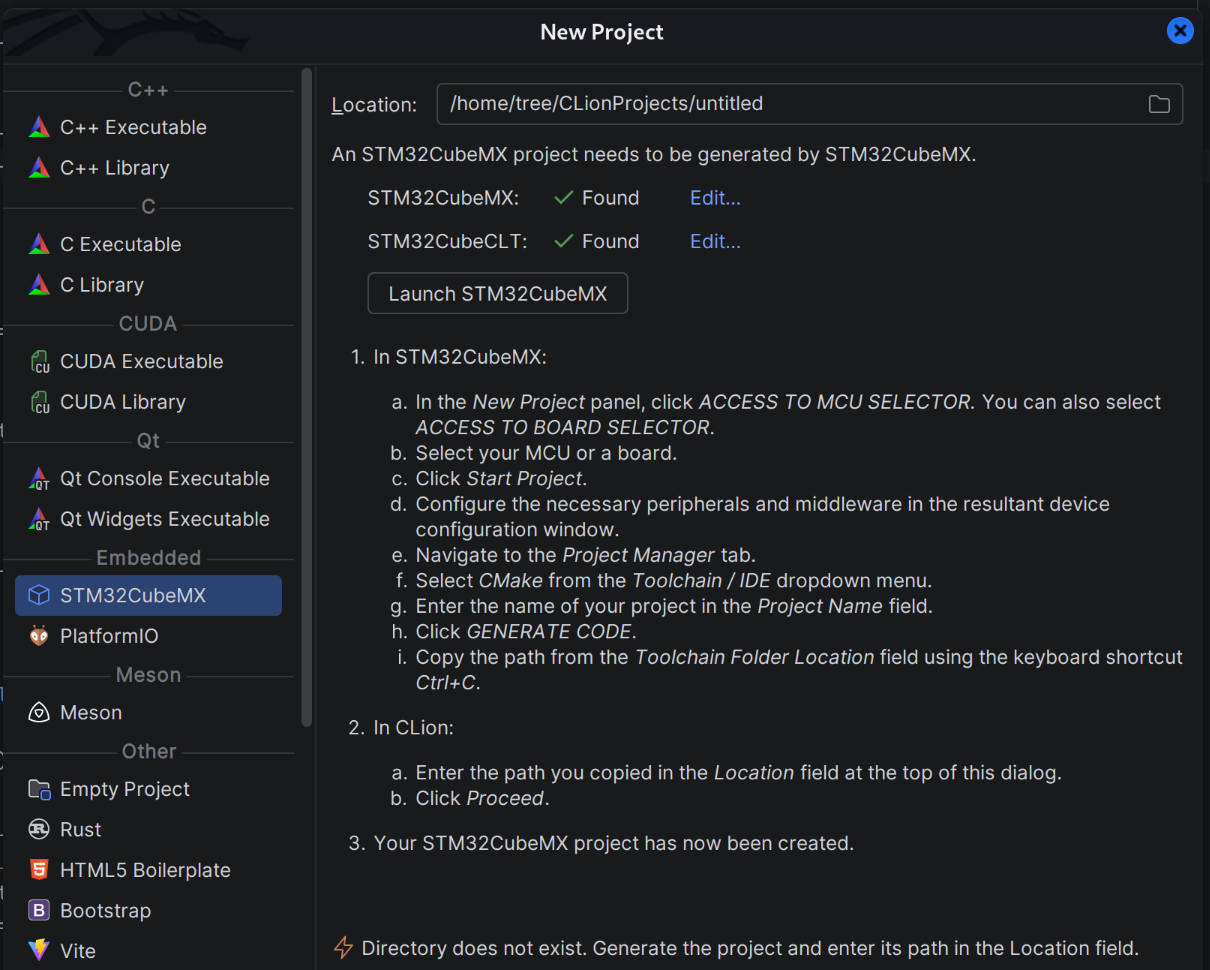
Then click Launch STM32CubeMX,finished configuration of stm32 chip.
Now go to the page Project Manager,enter the Project Name and Location, AND choose Toolchain/IDE CMake.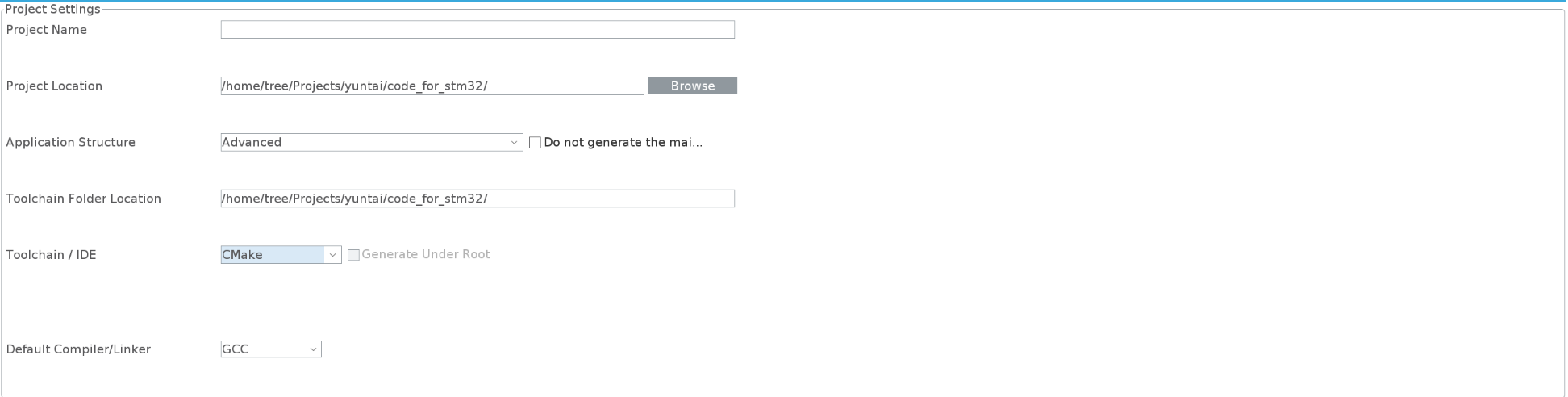
Generate Code!
Go back to CLion, the first time, it will ask you to choose the toolchain.choose the directory as picture below, all you need are in folder cubeMXctl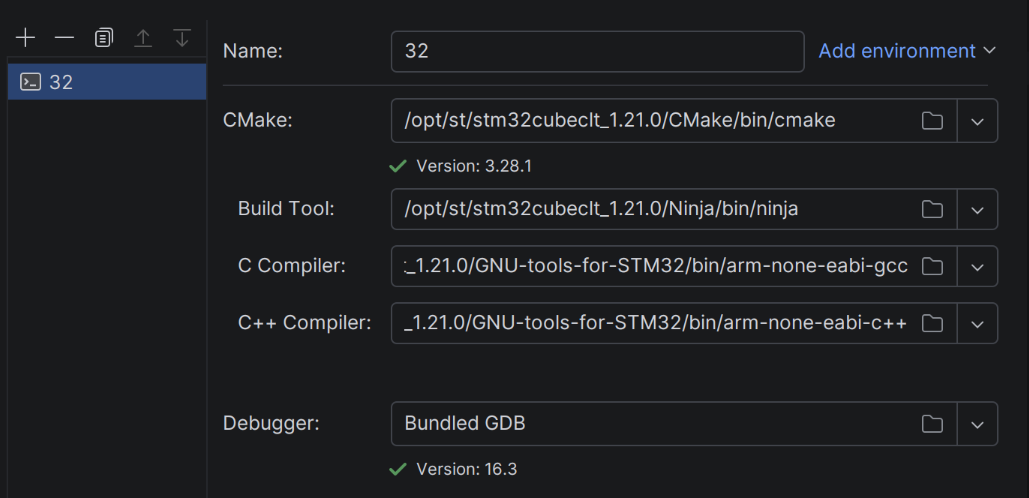
Then configurate CMake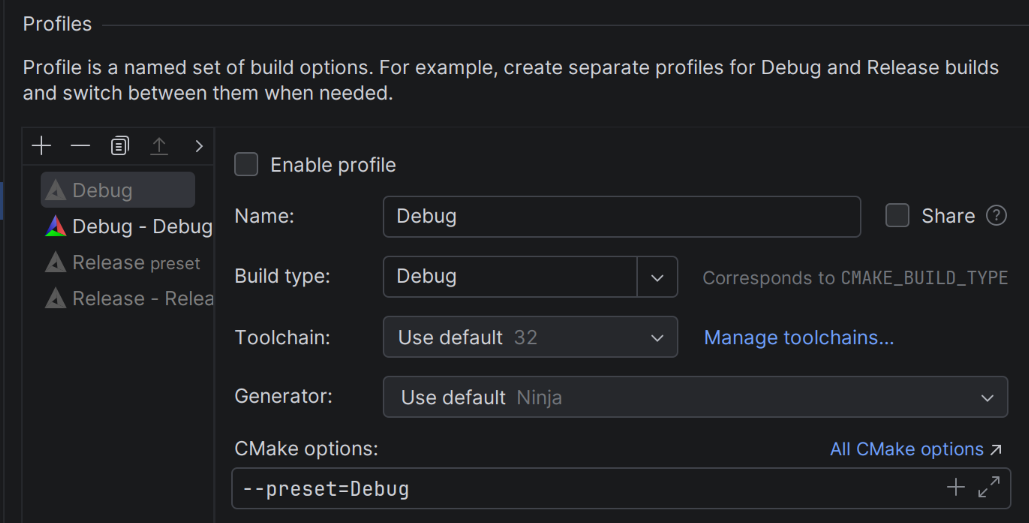
Tips: make sure you add “–preset=Debug” in CMake options.
Enjoy your development!
Now you have a stm32 HAL development environment under Linux!